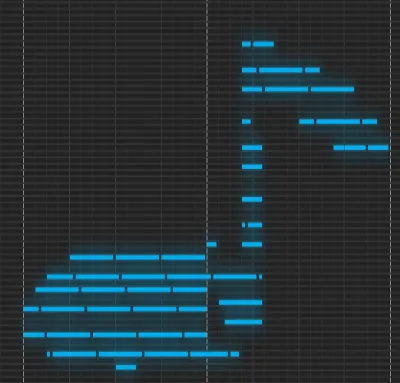
MIDI Art Generator: Free Web Tool to Convert Images and Text into Music Instantly
MIDI Art Generator is a revolutionary free web browser tool that automatically transforms your drawings
or text into musical data (MIDI files).
Whether you want to "create music from images" or "turn text into a melody," you can bring your creative
ideas to life intuitively without any professional musical knowledge.
The generated MIDI files can be downloaded and imported into major DAW (Digital Audio Workstation)
software such as Cubase, Logic Pro, Ableton Live, and FL Studio,
where they can be used as high-quality materials for your professional music production.
Key Features and Characteristics
1. Generate Music from Text (Text to
MIDI)
Simply enter your favorite words or phrases in the text box, and their shapes will be placed as notes on
a piano roll.
It supports not only English letters but also Emojis (☺️, ❤️) and other characters.
You can turn names or messages into music to create one-of-a-kind "musical message cards."
The length of the text (number of bars) can also be specified or automatically adjusted.
2. Generate Music from Images (Image to
MIDI)
Just drag and drop an image from your computer or smartphone, and the tool will analyze the brightness
and contours of the image to convert it into MIDI notes.
High-contrast images, logos, and hand-drawn illustrations are reborn with unique rhythms and melodies.
By applying edge detection technology, we balance visual beauty with musical creativity.
3. Automatic Correction Based on Music
Theory (Scale & Key)
Placing notes randomly often results in dissonance, but this tool includes Scale and Key quantization.
Choose from Major, Minor, Pentatonic, or Chromatic scales, and all generated notes will be automatically
corrected to fit within the specified scale.
This allows anyone to achieve a beautiful, "musically sound" resonance effortlessly.
4. Arpeggio Pattern Generation
In addition to static chords, you can apply arpeggio (broken chord) patterns to add movement to the
rhythm.
By selecting patterns like "Up," "Down," or "Sparkle," you can give dynamism and rhythm to static MIDI
data.
The BPM (tempo) can also be freely adjusted.
Example Output (Sample Track)
Here is a video demonstrating MIDI art generated with this tool.
Listen to how images and text are transformed into music!
Advanced Technique
Combine Text and Hand-Drawn Illustrations for Ultimate
MIDI Art!
Why not add your own hand-drawn illustrations to the base text created with the "Create from Text"
function?
Follow these steps to create even more original and complex works:
- First, enter your favorite text (name, message, etc.) and render it.
- Click the "Export to Image" button to save the current canvas as a
PNG file.
- Open that image in your favorite paint app (Photoshop, Procreate,
mobile drawing apps, etc.) and add illustrations like hearts, stars, or characters.
- Save the edited image and upload it again using the "Create from
Image" function.
This method allows you to combine the precise placement of text with the freedom of hand-drawn
curves for a truly unique and intricate piece of MIDI art!
Use Cases
- For Music Production (DAW Inspiration):
When you're stuck for melody ideas, trying to convert random images or text can lead to unexpected
lines and rhythm patterns, serving as a great source of inspiration. It's a perfect method for
incorporating luck or Aleatoric Music into your work.
- For Social Media Content: Show off your creativity on
Instagram, TikTok, or YouTube Shorts by generating messages like "Happy Birthday" as MIDI art and
sharing the performance video. It's a fresh way to enjoy content through both sight and sound.
- Sound Logo Creation: Experiment with creating sound
logos for brands or personal use by loading logo images and using their shapes as the basis for
audio branding.
- Games and Web Background Music:
Process the generated MIDI data in a DAW to create royalty-free BGM or sound effects for your
projects. (Copyright of the generated MIDI data belongs to the creator.)
How to Use (Step by Step)
- Choose Source:
From the left panel, select "Create from Text" or "Create from Image." Enter text and click "Render"
or upload a file.
- Edit Canvas:
MIDI notes will appear on the central black canvas. You can add notes with a click or delete them
with a right-click. Feel free to draw like you're using a paint tool.
- Adjust Musical Settings:
Use the bottom-left panel to change Key and Scale. You can also change the Arp Pattern to add
rhythm.
- Preview:
Press the play button (▶) at the top to preview the music in your browser. Repeat adjustments until
you're satisfied.
- Save and Export:
Once finished, click "Export MIDI" to download the `.mid` file, or save it as a PNG image with
"Export to Image."
FAQ
- Q. Can I use it on my
smartphone?
- A. Yes, it works on mobile browsers like Chrome and Safari
for iPhone and Android. It also supports touch-based drawing.
- Q. What about the copyright
of the generated music?
- A. The copyright for any MIDI data or music you generate
with this tool belongs to you. You are free to use it for commercial purposes, distribution, or
modifications.
- Q. Why is there no sound?
- A. Browsers often block auto-playing audio without user
interaction. Please click the page once or press play. Also, check your device volume and mute
settings.
- Q. What are the system
requirements?
- A. We recommend using the latest versions of Google
Chrome, Firefox, Safari, or Microsoft Edge. It may not work on older browsers like IE because it
uses modern web standards like Web Audio API and Canvas API.