
Create Boxed Text and ASCII Art for Social Media
Boxed text, ASCII art borders, and Unicode lettering can make a short announcement, headline, or punchline easier to notice in a busy feed. This generator creates ready-to-copy text for X (Twitter), Instagram, Discord, TikTok, and other apps that accept Unicode characters.
Enter your message, choose a box, speech bubble, divider, or fancy text style, and check the live preview before copying the result. The tool is free to use in your browser, with no account or app download required.
Boxed Text and ASCII Art Styles
1. Spiky ASCII Art Frames
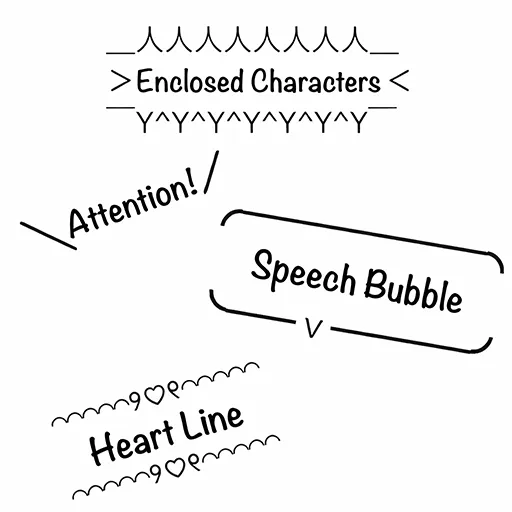
A spiky frame surrounds your message with bold edges and angle brackets. Use it for reactions, punchlines, game highlights, launch announcements, or any short line that needs extra emphasis.
_人人人人人人_
> ATTENTION <
 ̄Y^Y^Y^Y^Y^Y ̄
2. Speech Bubbles and Text Boxes
Use a speech bubble for dialogue, a boxed frame for an announcement, or angled marks for a short shout. Multiline messages are padded automatically so the frame stays balanced in the preview.
3. Cute and Aesthetic Text Dividers
Decorative lines add ribbons (୨୧), sparkles, flowers (🌷), hearts, stars, and other symbols above and below your text. They work well for profile bios, announcements, pinned posts, and section breaks in longer messages.
How to Make Boxed Text for X
You do not need to build the borders by hand. The generator formats and previews them for you.
- Enter your text: Type or paste the message you want to format.
- Choose a style: Select a spiky frame, speech bubble, box, decorative divider, or fancy Unicode style.
- Copy and post: Review the preview, click “Copy,” and paste the result into X or another app.
Fancy Unicode Text Styles
The Fancy Fonts tab converts Latin letters and numbers into styles such as bold, script, double-struck, monospace, and ⓒⓘⓡⓒⓛⓔⓓ text. These are Unicode characters—not downloadable font files—so you can copy and paste them into many social apps. Appearance and accessibility can vary by platform, so use decorative characters sparingly in essential text.
FAQ
Is this boxed text generator free?
Yes. You can create, preview, and copy as many designs as you like without signing up or installing an app.
Can I use the text on X, Instagram, Discord, or TikTok?
Usually, yes. The output is plain Unicode text, so it can be pasted into most apps and websites that accept text. Individual platforms may handle line breaks or uncommon characters differently.
Does it work on iPhone and Android?
Yes. The generator works in modern mobile and desktop browsers, and no app installation is required.
Why can ASCII art alignment change on mobile?
Character widths, fonts, and automatic line wrapping vary by device and platform. Keep each line short, check the preview, and test the pasted result when exact alignment matters.
Are fancy fonts actual font files?
No. They are Unicode characters that resemble different type styles. That makes them easy to copy and paste, but some characters may display differently or be harder for screen readers to interpret.