
Give your screenshots a helping paw.
Capture a screenshot, mark it up with arrows or text, and share it right away.
PurrSnapper keeps screenshot communication on macOS fast, clear, and low-friction.
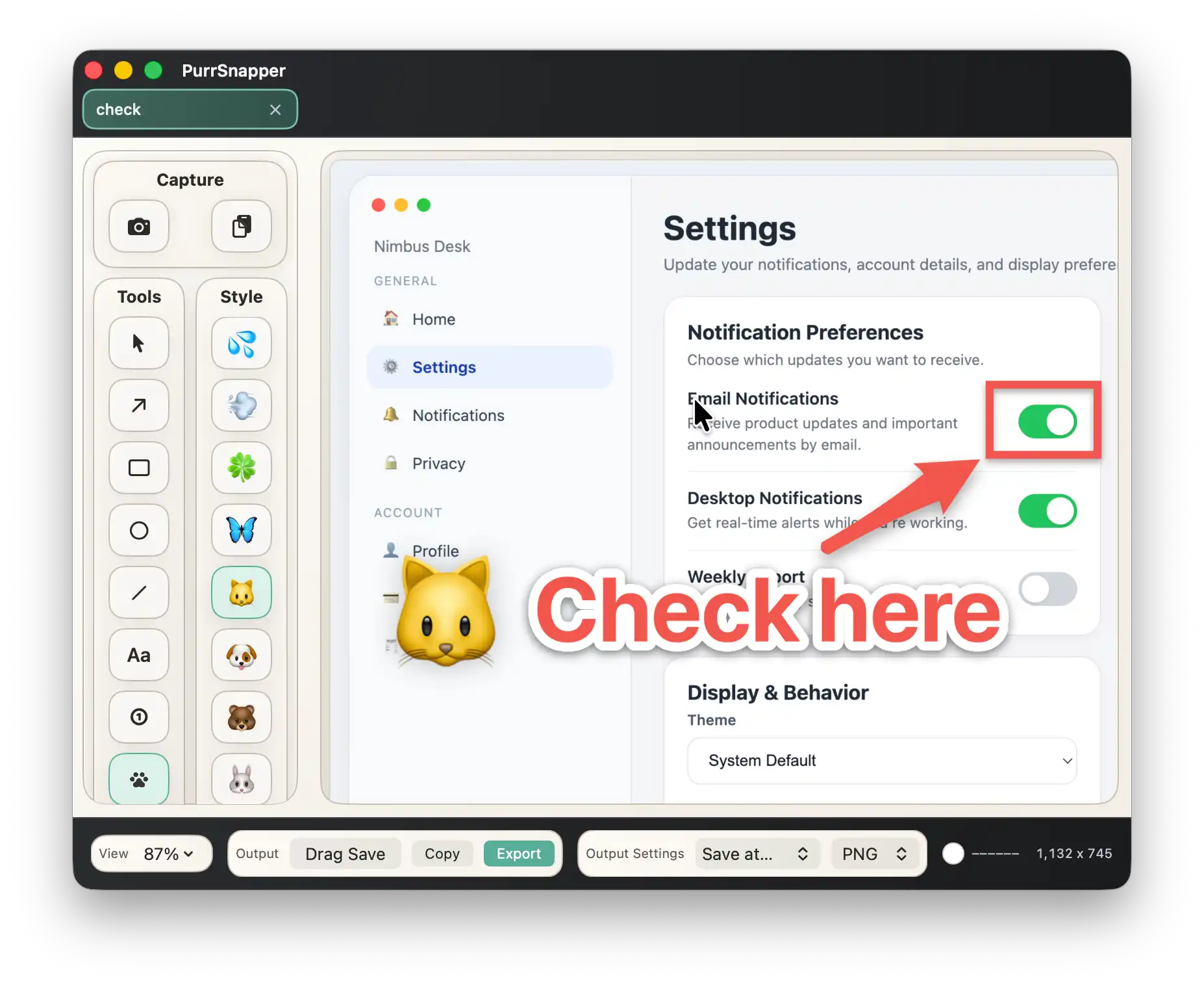
Capture → polish → share. The whole flow happens in one app.
Use six capture modes, including full screen, area selection, and window capture. Launch from the menu bar whenever you need it.
Add arrows, text, numbered stamps, pixelation, and more so people instantly know what they should look at.
Copy to the clipboard, drag and drop into another app, or export a file without bouncing between multiple tools.
From team chats to tutorials, PurrSnapper helps you explain what is on screen with less back-and-forth.
Need to say “click this button” in Slack or Teams? An annotated screenshot makes the answer obvious at a glance.
Use numbered stamps and highlights to turn a screen flow into clean, visual documentation.
Blur or pixelate names, email addresses, or account details before you share anything externally.
Circle the issue, add a note, and make it easier for teammates to understand what actually went wrong.
Capture workflows and add annotations to make tutorials, onboarding docs, and classroom material easier to follow.
Save common capture patterns as macros so repeated screenshots take one click instead of a routine every time.
Core features stay free. Upgrade to Pro when you need more tabs, project files, and advanced macros.
Grab your entire screen in one action.
Drag to capture exactly the part you need.
Capture after a countdown, even while menus or popovers are open.
Capture the frontmost window or click to choose a specific one.
Grab the same area again with a single click.
Point out exactly what matters.
Emphasize parts of the image with quick, flexible markup.
Add explanations and notes directly on the image.
Show a workflow in a clear 1 → 2 → 3 sequence.
Add a lighter tone or a visual accent where it helps.
Quickly hide the information you do not want to expose.
Adjust annotations afterward instead of starting over.
Dial in the look so your annotations stay readable and consistent.
Trim away everything that does not need to be shown.
Copy an annotated image and paste it straight into another app.
Send an image to another app just by dragging it over.
Save to the formats people expect most often.
Open a file, drag it in, or paste from the clipboard to keep editing.
Start a capture anytime from the macOS menu bar.
Launch common actions without taking your hands off the keyboard.
Save your common capture patterns and run them with one click.
Switch between multiple captures in tabs while you work.
Inspect fine detail and check the color code under the cursor.
Switch the interface language to match the way you work.
The core toolkit stays free forever. Upgrade when you need more tabs, project files, and advanced macros, with a US$12.99 one-time purchase or a US$0.99 monthly subscription.
Free
$0 / free forever
Pro
US$12.99 / one-time purchase
The core tools are free to use.
Make screenshot editing on macOS feel smoother.
PurrSnapper does not send your screenshots or annotation data to external servers.
Processing stays on your Mac.
You can use it for work or personal captures with confidence.
For usage rules, paid plan details, and key legal terms, please review the Terms of Service.